The archive for this part
BepInEx 6.0.0 Bleeding Edge build 785 (6abdba4), Unity IL2CPP flavour, win-x86 — pre-seeded with the Unity 2022.3.62 base libraries.
BepInEx-Unity_IL2CPP-win-x86-6_0_0-be_785_6abdba4.rar
PART 1 OF 3 · THE FOUNDATION
BepInEx is the loader that runs both plugins. This package is not the stock download — it has been configured specifically for Game Dev Story, so the usual first-launch pitfalls (wrong flavour, wrong architecture, stalled library download) are already solved before you extract a single file.
BepInEx 6.0.0 Bleeding Edge build 785 (6abdba4), Unity IL2CPP flavour, win-x86 — pre-seeded with the Unity 2022.3.62 base libraries.
BepInEx-Unity_IL2CPP-win-x86-6_0_0-be_785_6abdba4.rar
| Item | In this package | Why it matters |
|---|---|---|
BepInEx\unity-libs\2022.3.62.zip |
Pre-seeded (~2.4 MB) | Stock BepInEx BE downloads the Unity base libraries matching the game's engine version from the internet on first launch. This package ships them for Unity 2022.3.62 — the exact engine Game Dev Story 2.71 runs on — so the first run works fully offline and never stalls waiting on a server. |
| Flavour & architecture | Unity.IL2CPP · win-x86 | The game's GameAssembly.dll is 32-bit. The x64 build silently does nothing, and
stable BepInEx 5 (Mono) cannot load IL2CPP games at all. This is the one correct combination,
already picked for you. |
doorstop_config.ini |
Pre-wired | Target assembly already points at BepInEx\core\BepInEx.Unity.IL2CPP.dll; the bundled
.NET CoreCLR runtime paths (dotnet\coreclr.dll) are set. Nothing to edit. |
BepInEx\plugins\ & BepInEx\patchers\ |
Pre-created (empty) | The folders Parts 2 and 3 drop their DLLs into already exist — no guessing where files go. |
| Runtime | Bundled (186-file dotnet\ folder) |
IL2CPP BepInEx runs plugins on its own .NET runtime, shipped inside the package. You do not need to install .NET separately. |
Open the game folder
In Steam: right-click Game Dev Story in your library → Manage → Browse local files. A window opens at the game folder — on the reference machine that is:
F:\SteamLibrary\steamapps\common\GameDevStory
Yours may live under C:\Program Files (x86)\Steam\steamapps\common\GameDevStory or another
library drive. The folder you want contains GameAssembly.dll and the game's executable —
KairoGames.exe on the current Steam build. Keep this window open.
Extract the archive — contents, not the folder
Open BepInEx-Unity_IL2CPP-win-x86-6_0_0-be_785_6abdba4.rar in 7-Zip or WinRAR. Inside is a single top-level folder named
BepInEx-Unity_IL2CPP-win-x86-6_0_0-be_785_6abdba4. Enter it, select everything
inside it, and extract into the game folder from step 1:
what you extract (the contents of the archive's top-level folder):
BepInEx\            ← core, patchers, plugins, unity-libs
dotnet\             ← the bundled .NET runtime (186 files)
.doorstop_version   ← "4.5.0"
changelog.txt
doorstop_config.ini
winhttp.dll ← the injector — must sit NEXT TO KairoGames.exeIf you drag the archive's folder in instead of its contents, you end up with
...\GameDevStory\BepInEx-Unity_IL2CPP-win-x86-...\winhttp.dll and the loader never runs.
The test is simple: winhttp.dll must end up in the same folder as
KairoGames.exe. If Windows asks to merge or overwrite folders, say yes.
Check the result against the reference
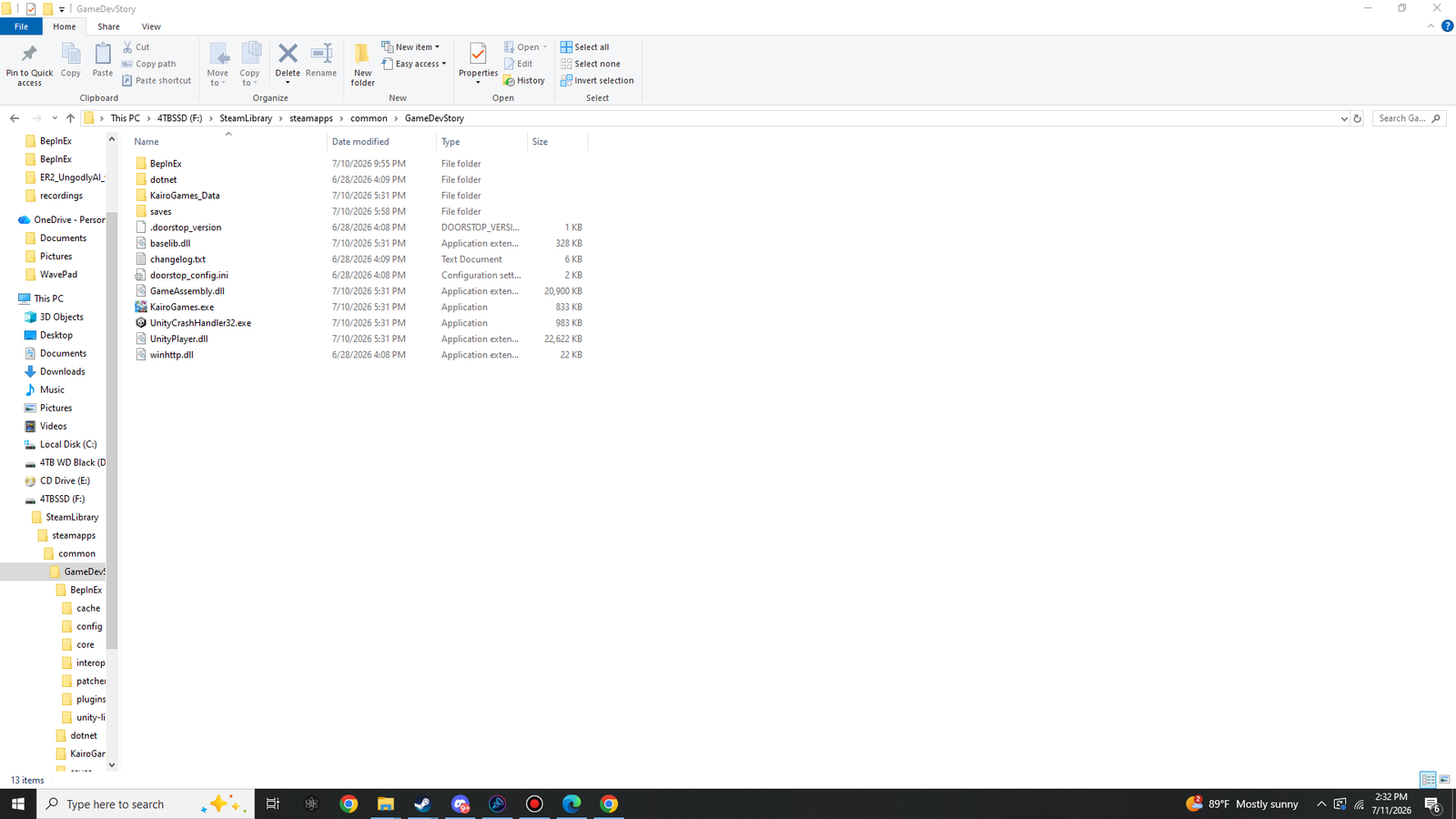
Your game folder should now look exactly like this (click the screenshot for full size). The five
game-owned items — KairoGames_Data, saves, baselib.dll,
GameAssembly.dll, KairoGames.exe, UnityCrashHandler32.exe,
UnityPlayer.dll — are joined by the six loader items you just extracted.
First launch — let BepInEx build its interop layer
Launch the game normally through Steam. The very first modded start does one-time work:
winhttp.dll, which boots BepInEx before the game.unity-libs\2022.3.62.zip is unpacked locally —
this is the step that needs the internet on stock BepInEx, and doesn't here.GameAssembly.dll and generate the interop assemblies into
BepInEx\interop\. This is the slow part — allow a minute or so; the game window may
take noticeably longer than usual to appear. That's normal, and it only happens once
(and again after a game update).When the title screen appears, quit the game. The loader is now fully baked.
A separate BepInEx console window may open alongside the game depending on the
[Logging.Console] setting in the auto-generated BepInEx\config\BepInEx.cfg —
either way, everything is also written to BepInEx\LogOutput.log. And because
winhttp.dll is a proxy DLL, an overzealous antivirus can quarantine it; if the game starts
completely vanilla with no log file, check your AV's quarantine and whitelist the game folder.
Verify the first run
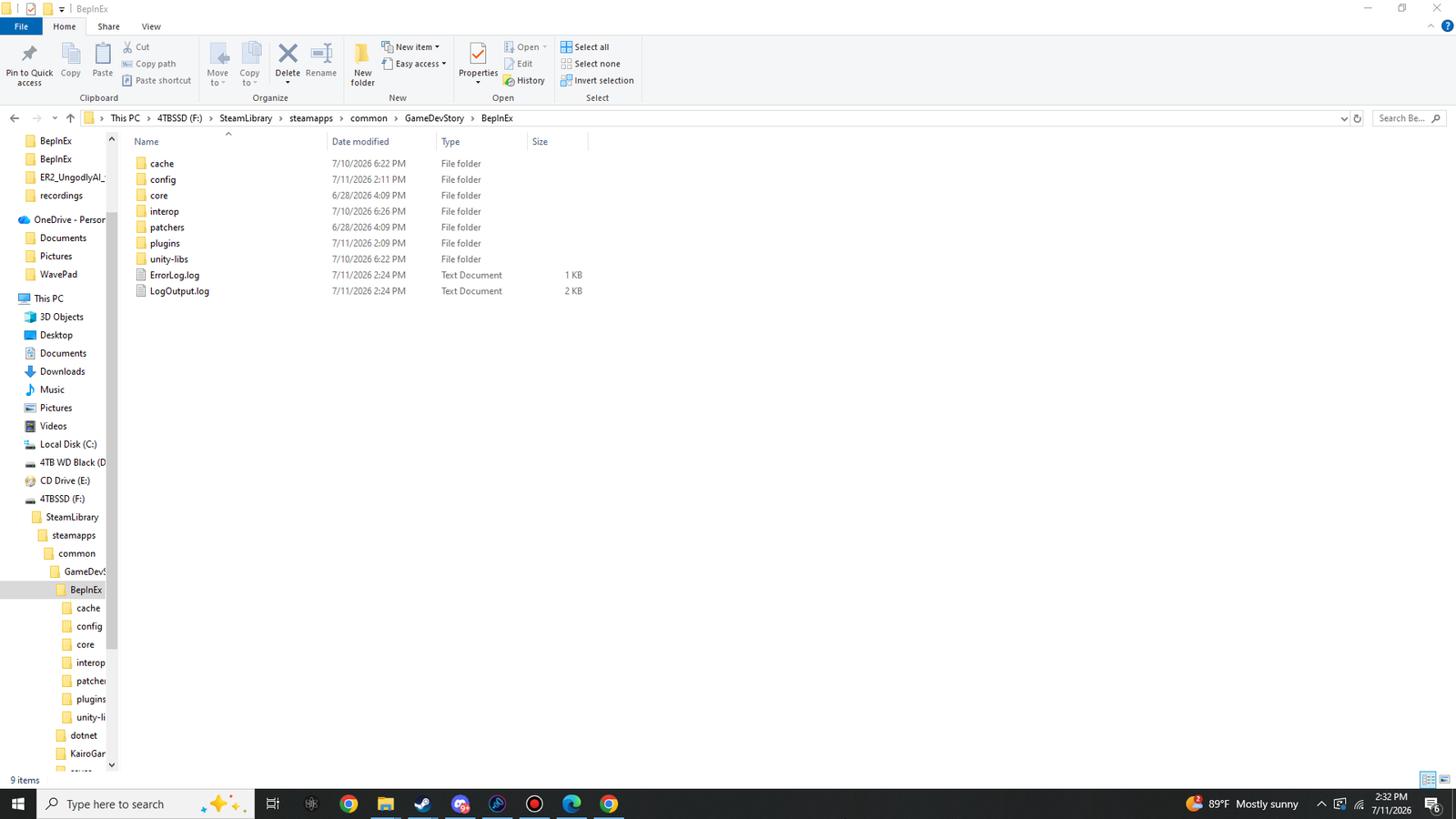
Open the BepInEx folder. Alongside the core, patchers,
plugins and unity-libs folders you extracted, the first run has generated
cache, config, interop and LogOutput.log:
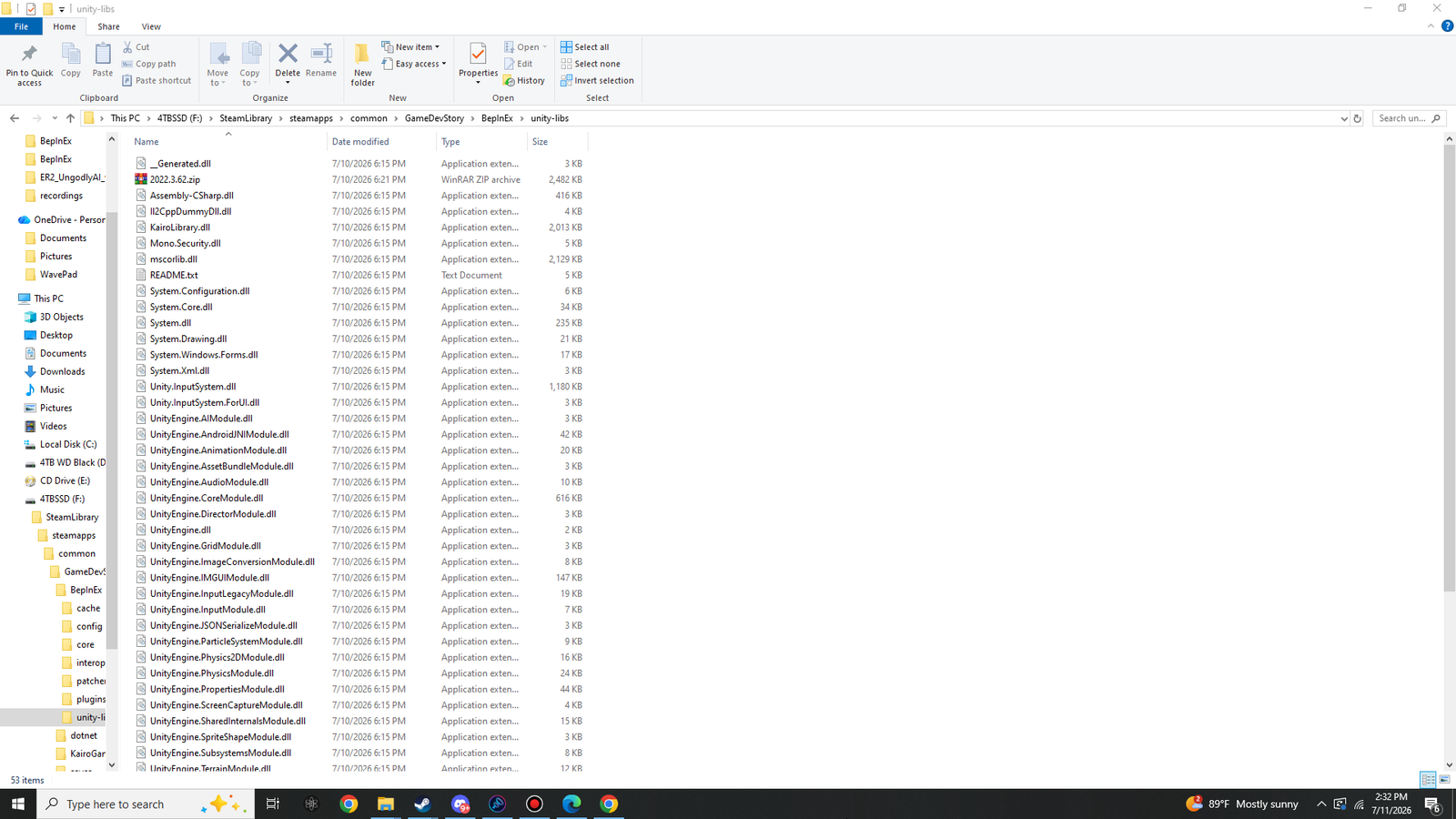
Inside BepInEx\unity-libs\ you can see the offline trick at work: the shipped
2022.3.62.zip has been unpacked into the full set of Unity engine assemblies —
53 items, no download required:
Open BepInEx\LogOutput.log in Notepad. A healthy first run begins with the BepInEx banner
naming this exact build and the game:
[Message:   BepInEx] BepInEx 6.0.0-be.785 - KairoGames
...
[Info   :   BepInEx] 0 plugins to load
"0 plugins to load" is correct at this stage — Parts 2 and 3 fill that in.
You may see [Warning:Il2CppInterop] Class::Init signatures have been exhausted, using a
substitute! in the log (and a small ErrorLog.log may exist). This is emitted by
BepInEx's own interop runtime while bootstrapping against Unity 2022.3.62, before any
plugin loads. It is a known, harmless notice on this engine version — not a fault in your
install, and nothing a plugin can produce or remove.
The loader is installed and baked. The plugin folder at
...\GameDevStory\BepInEx\plugins\ is standing by — on to
Part 2: UngodlyEndless.